Saturday, 15 December 2012

KBarcode-kde4 port ready and released

KBarcode has been ported to KDE4/Qt4 by Fanda. Also some of the older bugs related to GUI have been fixed. It seems stable. The new version of KBarcode for KDE4/Qt4 has been renamed to KBarcode-kde4 so that users can have the old KBarcode for KDE3/Qt3 as well as the new KBarcode for KDE4/Qt4 installed on one system.

KBarcode-kde4 uses Akonadi. KCommand and related stuff has been ported to QUndoCommand and so on ... Spellchecking was ported to Sonnet but the new implementation of Sonnet in KBarcode-kde4 is odd and complicated so it will be deprecated and replaced in a future version.

KBarcode-kde4 is currently in a beta stage. It is not in Ubuntu or Debian repositories yet. At the moment (2012-12-14) only a deb package for amd64 architecture exists. Download the deb package kbarcode-kde4_3.0.0b2-1_amd64.deb from https://sourceforge.net/projects/kbarcode/files/Development/3.0.0b2/kbarcode-kde4_3.0.0b2-1_amd64.deb and follow instructions in https://sourceforge.net/projects/kbarcode/files/Development/3.0.0b2/README-INSTALL.txt to install it.

The source code can be found in the source tarball at http://sourceforge.net/projects/kbarcode/files/Development/3.0.0b2/kbarcode-kde4_3.0.0b2.tar.gz/download or in the GIT repository at https://gitorious.org/kbarcode-kde4/kbarcode-kde4/commits/master.

Thank you very much for your work Fanda!

Wednesday, 12 September 2012

Quality-Check 0.10 released

We releases Quality-Check 0.10 today! The new release includes several new checks such as:
  • Check.instanceOf
  • Check.isNumber
  • Check.isNumeric
  • Check.notNaN

Most importantly you should check-out our enhanced webpage and especially our comparison, where we compare Check with other classes like org.springframework.util.Assert [1] or com.google.common.base.Preconditions [2] or org.apache.commons.lang3.Validate [3].

Wednesday, 5 September 2012

Quality-Check for Java

André Rouél and I startet a new OpenSource project to avoid technical errors in Java applications: Quality-Check.

The goal of quality-check is to provide a small Java library for basic runtime code quality checks. It provides similar features to org.springframework.util.Assert or com.google.common.base.Preconditions without the need to include big libraries or frameworks such as Spring or Guava. 
The package quality-check tries to replace these libraries and provide all the basic code quality checks.

Example


/**
 * Sets the given object if it is not null.
 * 
 * @throws IllegalArgumentException
 *         if the given argument is {@code null}
 */
public void setObject(final Object object) {
    if (object != null) {
        throw new IllegalArgumentException("Argument 'object' must not be null.");
    }
    this.object = object;
}


can be replaces by:

/**
 * Sets the given object if it is not null.
 */
@ArgumentsChecked
public void setObject(final Object object) {
    this.object = Check.notNull(object);
}

It is now available in Maven Central so adding it to your project is as simple as putting these five lines into your pom.xml:
<dependency>
<groupid>net.sf.qualitycheck</groupid>
<artifactid>quality-check</artifactid>
<version>0.9</version>
</dependency>

Please take also a look at our webpage or our project at GitHub.

Sunday, 15 July 2012

PoDoFoColor Lua Scripting


sdaau wrote in with some news about podofocolor, I'd like to share:

I just found about podofocolor on http://domseichter.blogspot.dk/2011/01/modifying-and-analyzing-colors-in-pdf.html - and I got really interested in "Analyzing colors - Find out, which colorspaces or colors are used in a PDF". I couldn't find an example of how to do that on that page, and I assumed the only way to do is through Lua.

Unfortunately, while there are some PPA builds for Ubuntu ( see http://sdaaubckp.svn.sf.net/viewvc/sdaaubckp/offext-call-scripts/podofo.sh ), those do not have Lua built-in, so I rebuilt podofo and utils on Lucid, and posted the executables here - since they are statically linked, they may be useful to others as well:

http://sdaaubckp.sourceforge.net/post/libpodofo-utils-lucid/

I have also recorded the steps to building those executables in http://sdaaubckp.svn.sf.net/viewvc/sdaaubckp/source-build-scripts/get-podofo-src.sh

The above directory also contains a modification of the example.lua script:

http://sdaaubckp.sourceforge.net/post/libpodofo-utils-lucid/example-colorlist.lua

... which can be used to simply print out any color encountered in a PDF, by using this command line:

$ ./libpodofo-utils-lucid/podofocolor lua example-colorlist.lua /path/to/mytest.pdf /dev/null

<]/Info 2 0 R/Root 1 0 R/Size 16>>
Processing page 1...
-> Lua is parsing page: 1
Reading object 6 0 R with type: Number
set_non_stroking_color_gray: 1
set_non_stroking_color_cmyk: 0.233887 1 1 0.218994
....

Note that it is important to add `/dev/null` as output file - otherwise, both the color report _and the pdf in its entirety_ will be dumped to the terminal - making the report about colors impossible to read.

I would have appreciated a lot a similar guide/explanation on the blogspot webpage (or in a help/readme); and I'd be very happy if some of this here can contribute towards more detailed examples in then documentation.

Many thanks for the great software,
Cheers!  


The original post can be found here: http://sourceforge.net/tracker/?func=detail&aid=3539970&group_id=154028&atid=790133
If you also have interesting PoDoFo stuff to share, feel free to drop me a mail.

KBarcode KDE4 Port Status Update

Fanda provided some updates on the status of the KBarcode-KDE4 port:

The version tagged as "port-1.0" on gitorious.org/kbarcode-kde4 works and has the most of the Kbarcode's functionality except a database support. It compiles succesfully with few compile warnings and uses all of the Kbarcode's source files except gnubarkodeengine.cpp and gnubarkodeengine.h . But it still uses QT3 support classes like Q3Canvas, Q3SqlCursor, Q3DataTable, Q3SimpleRichText, etc. I am currently working on porting the QT3 support classes to pure QT4. I have already ported Q3Canvas and related stuff to QGraphicsScene (which proved to be the most difficult porting) but I haven't pushed it to the online repository on gitorious.org/kbarcode-kde4 yet.
I am so glad to this project to be continued! It looks much prettier than the KDE3 version and even did import my old KBarcode3 label files without any problems.

Want some screenshots? Here you got.


Sunday, 6 February 2011

Directory Management with KRename

Yesterday, I got a very interesting e-mail from Todd about using KRename. His request required one new feature which was added to KRename SVN and makes KRename even more powerful. So, I think his usecase is interesting enough to be shown here.

First of all, he has several files which he wants to sort into different directories based on parts of their names. If the filename contains the word "essay" it is supposed to go into a subdirectory called "essay/" and the same should be done for the memo's. His example list of files looks like this:


Work Essay for fred.txt
Work Essay for bob.odt
Work Essay for alice.doc
Work Memo for mary.odt
Work Memo for ben.txt
Work Memo for carey.doc


At the end, we want a directory and file structure like this:

Essay/Work Essay for fred.txt
Essay/Work Essay for bob.odt
Essay/Work Essay for alice.doc
Memo/Work Memo for mary.odt
Memo/Work Memo for ben.txt
Memo/Work Memo for carey.doc


You can create directories in KRename during renaming of files using the [dirsep] operator or by simply using a / (slash) in the template. So, the template newdir[dirsep]$ will create a new directory called newdir and move all files to this directory. The token $ is KRename' way of saying, "insert the original filename here".

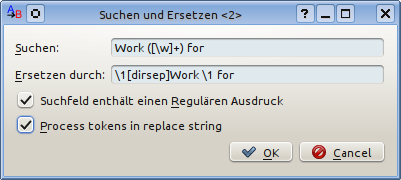
Now, one can combine this feature with the powerful regular expressions. Just go to the "Search and Replace ..." dialog and enter the regular expression Work ([\w]+) for and replace it with \1[direp]Work \1 for. The backreference \1 inserts a matched string from the regular expression into the results. Thereby, we can include either "memo" or "essay" in the new directory name. The matched part is indicated by brackets in the regular expression.

To make this work, one new feature was added to KRename. The dialog contains a new checkbox which allows to enable processing of KRename tokens in the replacement string of find and replace. We need this feature to process the [dirsep] token correctly and create a new directory
See the screenshots below.


If you have similar interesting usecases for KRename or questions on how to do thinks, do not hesitate to write a mail to our mailinglist!

Sunday, 30 January 2011

Modifying and analyzing colors in PDF files using podofocolor

What is podofocolor?


Podofocolor is the newest addition to the podofo-tools package. It is a command-line tool to analyze and/or modify all colors in a PDF file. This can be done using predefined rules or based on a custom Lua script.

Basically, podofocolor opens a PDF file and goes through every page or vector graphics object (e.g. an XObject) and looks at every PDF command. Whenever it encounters a colorspace definition or a PDF command, which sets a color for a following PDF operation like “draw a line” or “fill area with color”, an action can be performed. These actions are either predefined actions or can be defined by implementing a C++ interface or more likely by providing a Lua script. Predefined actions are “convert this color to grayspace” or “print color name to stdout”; however more complicated actions can be easily created as well. As can be seen by the “grayscale”-action, the most powerful feature of the tool is to replace colors in a PDF file. Custom color conversion algorithms can be implemented in Lua and be immediately applied to any PDF file.

How is it useful?


There are different use-cases for such a tool and I assume users will come up with even more options. Possible usage scenarios that come to my mind can be categorized in two areas: analyzing colors and modifying colors.

  • Analyzing colors

    • Find out, which colorspaces or colors are used in a PDF

    • Verify that certain colors are not used in a PDF

    • Verify that only CMYK or ICC-based colors are used in a PDF


  • Modifying colors

    • Convert colorspace of a PDF (e.g. convert it to grayscale or CMYK)

    • Convert colors in a PDF to certain corporate colors

    • Split one PDF file into four different PDF files, where each file represents one component of the CMYK colors used in the PDF. As a result, you will receive one PDF containing only the cyan color channel, one containing the yellow one, etc..


Usage


The usage of the command-line tools is simple:

./podofocolor [converter] input.pdf output.pdf

Different values are possible to be used as a converter. The table below lists all converters which are currently available:


Converter   Description
dummy   This is an example implementation of a converter in C++, which will convert all colors in a PDF to RGB red.
grayscale   The grayscale converter changes all colors to its grayscale equivalents in a grayscale colorspace.
lua planfile   The Lua converter is the most powerful one. It takes a lua file as another parameter. This Lua file provides the color conversion descriptions implemented as Lua functions.

For example, to convert the colors in a PDF file using the included example.lua file, you would use the following command:

./podofocolor lua example.lua input.pdf output.pdf


Writing own converters


For the tool to be really useful, you will have to create your own converter. This can either be done by implementing the C++ interface IConverter or by creating a small and simple Lua script. If you consider creating a C++ implementation of the interface, the included Doxygen comments will be enough to get you started (Yes, it is that simple! For example, the grayscale converter consists of only 44 lines of source code and most other conversions will be the same size), so we will skip the C++ part and go straight to Lua.

Lua is a very simple, yet powerful, scripting language. To get started, it is best to download the example.lua file included in PoDoFo. It contains all the necessary function definitions, which you can adapt to your needs.

We will start with a short example: whenever podofocolor finds a definition of a stroking color on a PDF page (i.e. a color which is used when drawing lines or curves), it will call one function in the Lua script. The function called depends on the colorspace of the color definition. Currently, there are three different functions that can be called. set_stroking_color_gray will be called when a grayscale color is defined. Similarly, set_stroking_color_rgb or set_stroking_cmyk are called.
The example below shows an implementation of set_stroking_color_rgb with a rather simple implementation. The function gets the three parameters r, g, and b, which refer to the values of the red, green, and blue color components. The values are in the range of 0.0 to 1.0 as it is common in PDF files, where (0.0, 0.0, 0.0) is black and (1.0, 0.0, 0.0) is red. Now to the concrete function implementation: It checks if the passed color is black, if yes it returns a tuple with four values – which is a CMYK color – and thereby converts any occurrence of RGB black to CMYK black. For all other color values a tuple with three values is returned and the RGB color is not changed. Another option would have been to return a tuple with a single value and thereby convert the color to a gray value.


function set_stroking_color_rgb (r,g,b)
-- convert all black rgb values to cmyk,
-- leave other as they are
if r == 0 and
g == 0 and
b == 0 then
return { 0.0, 0.0, 0.0, 1.0 }
else
return { r,g,b }
end
end


Other functions in the script provide information about pages, objects, etc...

Limitations


Currently this tool does not convert images embedded in the PDF file. First of all, the focus of the tools is on modifying colors in PDF files and secondly, there are other tools, which can modify colors in images and/or work with images embedded in PDF files. If there is demand for such a feature, it can be easily added. Podofoimgextract, another PoDoFo-tool, is a good example of how easy it is to work with images using the PoDoFo API.

Download


Podofocolor is currently available in SVN trunk. Instructions on how to get and build PoDoFo trunk can be found on our website. It works on all supported platforms, including Windows and Unix systems. We are interested in your feedback! Feel free to drop a mail containing your feedback, comments, or suggestions to our mailing-list podofo-users@lists.sourceforge.net.